
Hugging Face AutoTrainTearDown
About AutoTrain
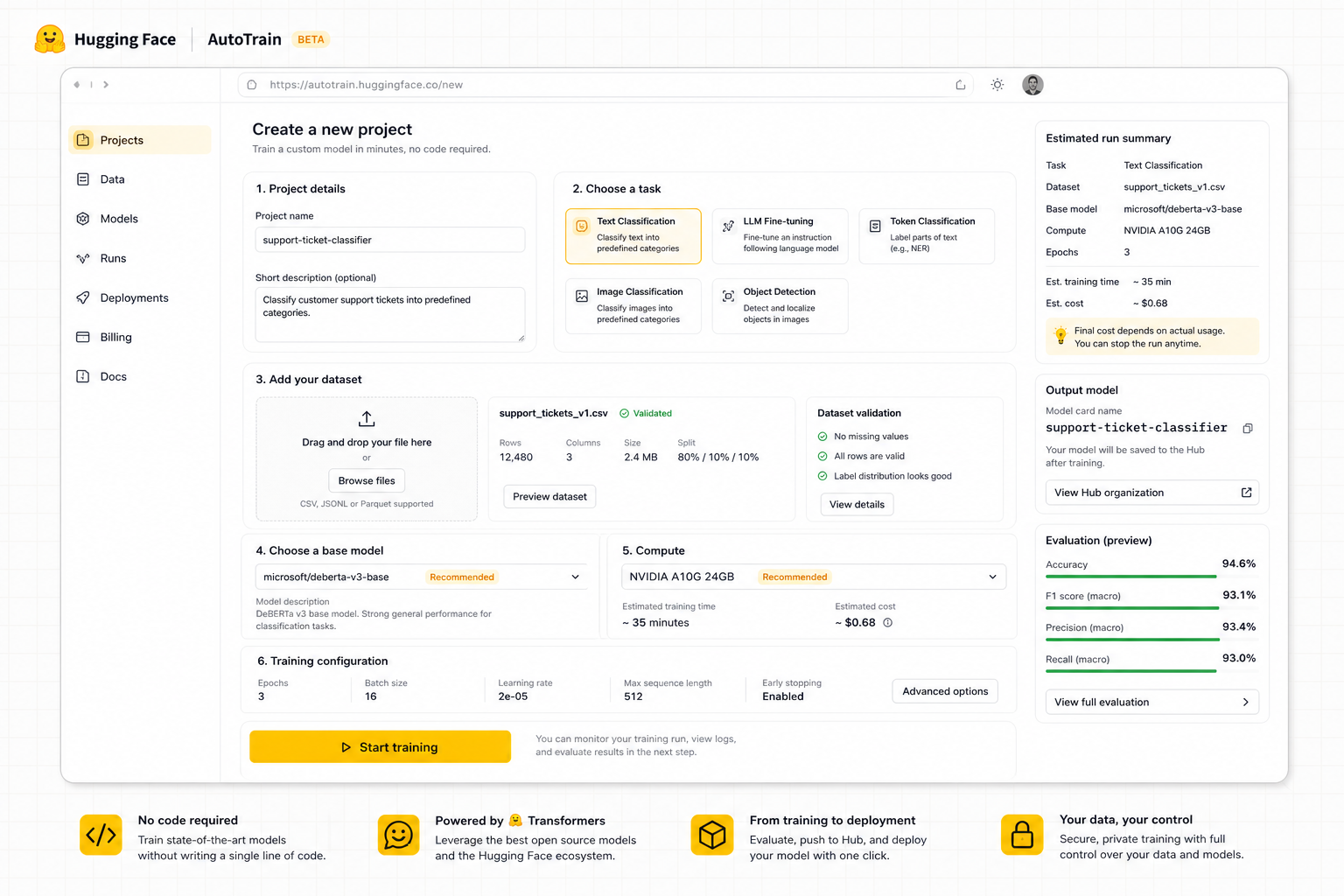
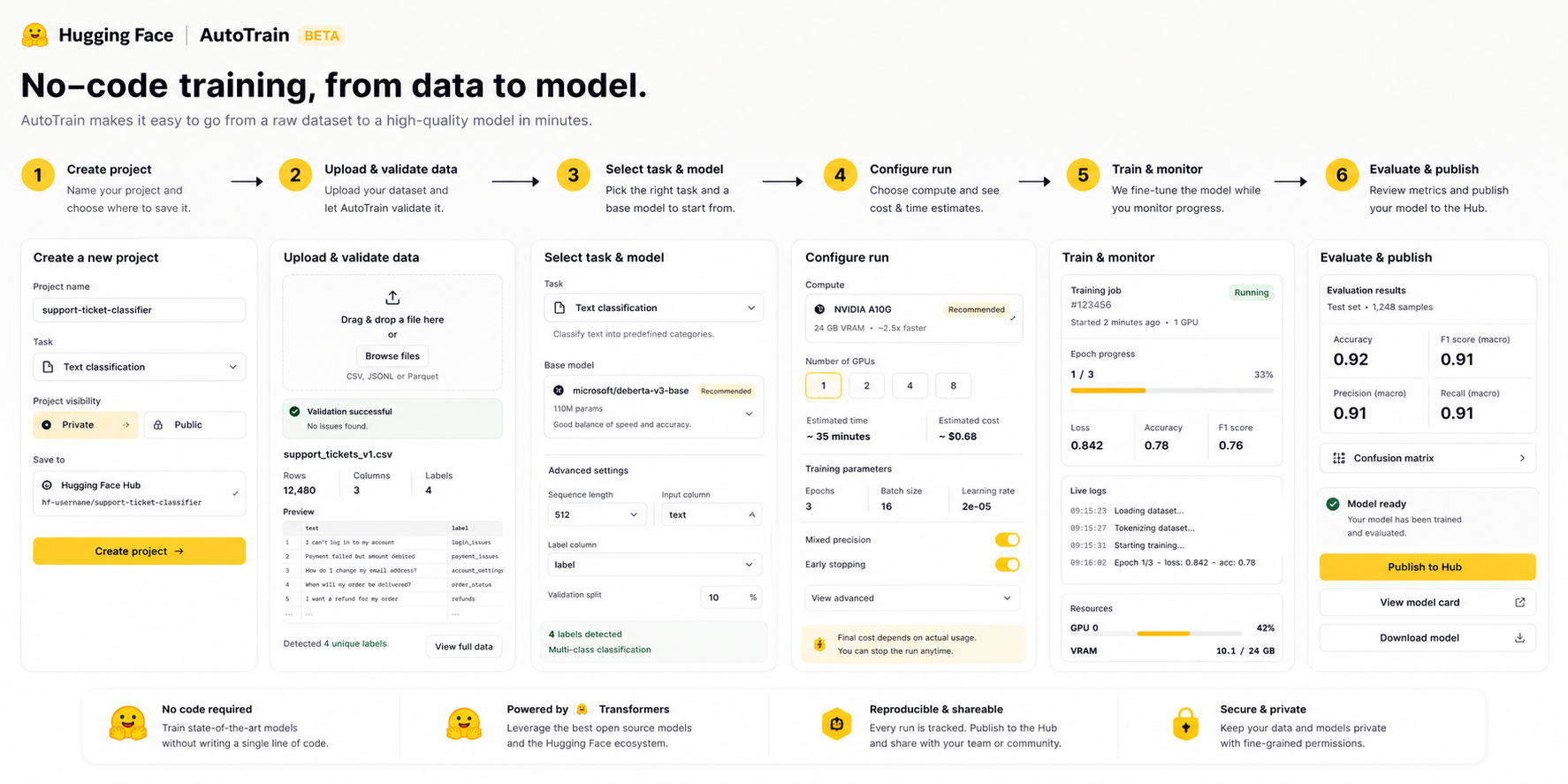
Hugging Face AutoTrain helps users train or fine-tune machine learning models without writing training code. The teardown studies how a no-code training platform can help builders understand data readiness, cost, quality, and deployment confidence before they launch a job.
Business Signal
Product insight: as AI builders move from demos to deployed workflows, the core product value shifts from access to confidence, readiness, and explainability.
Problem Discovery
The highest-value problem is not simply "users need a no-code button." The product problem is that non-expert builders can start training before they understand whether their dataset, task choice, hardware, and budget are ready.
Users upload data but may not understand format errors, label imbalance, leakage, or task mismatch until the job fails or produces weak results.
Builders cannot predict cost, time, expected quality, or what to fix before spending GPU time.
If the first project fails without clear repair guidance, users may return to notebooks or competing managed training tools.
PM QuestionHow might AutoTrain guide no-code builders from raw dataset to training-ready project before compute is spent?
User Personas
The teardown compares four model-building users, then focuses on Maya because her use case is valuable but she does not have deep ML operations experience.

Rohan Iyer
Startup Backend Engineer- Age / City
- 29, Bengaluru
- Skill
- Intermediate
- Need
- Support ticket classifier
- Pain
- Dataset format and evaluation uncertainty

Priya Shah
Growth Analyst- Age / City
- 31, Mumbai
- Skill
- Beginner
- Need
- Lead scoring with tabular data
- Pain
- Does not know if columns are training-ready

Anjali Rao
Research Assistant- Age / City
- 26, Delhi
- Skill
- Advanced beginner
- Need
- Image classifier for a lab dataset
- Pain
- Unclear labels and augmentation choices

Maya Patel
AI Product Builder- Age / City
- 34, Pune
- Skill
- Target user
- Need
- Fine-tune a domain chatbot
- Pain
- Needs confidence before GPU spend
Maya Patel, AI product builder
Maya is the best teardown lens because she has a real business use case and enough AI awareness to try AutoTrain, but needs product guidance on dataset quality, expected cost, and model readiness.
User Journey Map
The journey breaks before the product value is realized: the user cannot confidently move from intent to trustworthy outcome.
Finds AutoTrain as a no-code path to fine-tune a model on company support data.
🙂 CuriousKnows the outcome she wants, not the training constraints.
Show task examples and dataset requirements before project creation.
Exports CSV conversations and tries to map columns.
🤔 UnsureDoes not know if labels, prompt format, or train/validation split are correct.
Add dataset readiness scanner and repair suggestions.
Chooses task, model family, hardware, and training settings.
😟 CautiousHardware and cost implications are difficult to compare.
Show cost/time/quality estimate before starting.
Starts job and waits for result.
😬 AnxiousLow visibility into whether the run is healthy.
Expose live training health and plain-language warnings.
Model underperforms or job fails due to dataset issues.
😞 FrustratedFailure appears after compute has already been used.
Offer explainable failure diagnosis and one-click retry plan.
Receives dataset repair plan and recommended settings.
🙂 RelievedNeeds to know which fix matters most.
Rank fixes by expected quality lift and effort.
Publishes model artifact or pushes to Hub.
😊 ConfidentUnsure if model is production-safe.
Add readiness checklist and model-card quality gates.
Improves data and retrains.
🙂 FocusedNeeds history across runs.
Provide experiment comparison and next-best training action.
Pain Prioritization
Before choosing a solution, the teardown compares the strongest pain points and uses RICE to identify which problem deserves the first product bet.
Users cannot tell if uploaded data matches task requirements before training.
Users worry about cost and time when choosing hardware or model size.
Users need a pre-flight view of data quality, estimated cost, expected run health, and next fixes.
| Pain point | Reach | Impact | Confidence | Effort | RICE |
|---|---|---|---|---|---|
| Dataset format errors | 4 | 4 | 4 | 2 | |
| GPU cost uncertainty | 3 | 5 | 3 | 3 | |
| Training readiness is unclear | 5 | 5 | 4 | 2 |
Decision: prioritize the clarity/readiness gap because it has the strongest reach-to-effort ratio and can be improved through product guidance before deeper platform changes.
Recommended Solution
Ideas are split by execution ambition first. The final prioritization is applied only to Moonshot ideas because those are the strategic bets that need a clear PM decision framework.
OK Ideas
Best Ideas
Moonshot Ideas
Solution Prioritization
Solution Discussion
Selected solution: Autonomous training readiness copilot. The product should make the hidden AI/system decision visible before users commit time, money, or trust.
A pre-flight and in-run advisor that converts dataset quality, task selection, hardware choice, cost risk, and evaluation signals into a clear training path.
- Inspect
Read schema, labels, sample quality, task type, model choice, and hardware requirements.
Data contract: dataset_id, task_type, model_family, hardware_tier. - Score
Classify readiness, cost risk, quality risk, and failure probability before training starts.
Decision contract: ready_state, blockers, confidence, expected_run_cost. - Guide
Show fixes, estimated lift, recommended settings, and training CTA only when guardrails pass.
UI contract: readiness card, repair drawer, cost simulator, launch CTA. - Learn
Compare outcomes across runs and tune recommendations by task, data size, and failure reason.
Feedback loop: run history, eval metrics, failure taxonomy.
Dashboard card, explanation drawer, readiness state, recommended action, and safe launch CTA.
- Status badge
- Reason drawer
- Next action
Feature extraction, scoring service, reason-code mapper, recommendation engine, and audit log.
- Policy engine
- Signal store
- Audit trail
Cost, quality, accuracy, data, and user-trust guardrails before surfacing a confident CTA.
- Confidence checks
- Fallback state
- Logs
Higher successful completion, lower failed attempts, lower support dependency, and stronger retention.
- 10% pilot
- Quality guardrail
- Retention lift
Implementation Plan
Launch as a controlled pilot: build explainable readiness decisions first, then expose them through builder, support, and monitoring surfaces.
Capture product inputs and user context.
Convert signals into readiness state and reasons.
Surface guidance and safe next action.
Track outcome and learn from failures.
Dataset scanner, task validator, hardware estimator, readiness score.
Owner: Product + EngineeringPre-flight card, cost simulator, repair drawer, launch states.
Owner: Product + DesignFailure taxonomy, run telemetry, model-card gates, support playbooks.
Owner: Product + OpsFinalize signal inputs, states, and decision contract.
Decision API, UI states, and event tracking.
Backtest decisions and review trust copy.
Launch to controlled cohort with guardrails.
Expand after quality, adoption, and retention checks.
Quality: readiness logic matches expert review.
Product: fewer failed attempts and lower support dependency.
Business: higher completion and repeat usage.
Success Metrics
Metrics must prove the product improves user confidence and successful completion without creating low-quality outcomes.
Percentage of qualified builders who receive guidance, take the recommended action, complete the workflow, and meet quality guardrails.
Readiness card viewed → explanation opened → action started
>35%Shows users understand the guided path.
Low confusion and low support escalation.
Recommended action completed successfully
20-30%Measures whether guidance becomes real product value.
Quality pass rate stays high.
Outcome meets product-specific readiness threshold
>80%Prevents growth from becoming low-quality usage.
No increase in failed jobs or mistrusted output.
Repeat usage, retention, expansion, lower switching
>70%Confirms the product keeps valuable builders.
Revenue grows without trust deterioration.
GTM
Launch should start with users already trying to build or deploy, not broad awareness. The motion is product-triggered, guidance-led, and guarded by quality checks.
Users with clear intent and measurable workflow completion.
Show guidance when the user reaches a high-risk decision point.
Dashboard cards, docs examples, templates, email nudges, and support scripts.
Limit rollout by success rate, quality threshold, and support impact.
Budget Allocation
Run readiness logic without changing user flow.
Expose guidance to controlled cohort.
Trigger CTA only when guardrails pass.
Expand by success, trust, and retention checks.
Summary
The teardown identifies a high-value AI product clarity gap and turns it into a prioritized solution, rollout plan, metrics system, and GTM motion.
Users need confidence before committing time, money, or trust.
The selected user proves the issue is product clarity, not only technical capability.
A pre-flight and in-run advisor that converts dataset quality, task selection, hardware choice, cost risk, and evaluation signals into a clear training path.
Build decision service, builder UI, quality guardrails, and monitoring loop.
AutoTrain should not let builders spend compute before they understand training readiness. The product opportunity is to turn hidden ML setup complexity into a clear, guided path from dataset to usable model.