About Product
1.1 What We Are Making
AutoTrain Readiness Copilot is a guidance layer inside Hugging Face AutoTrain that tells builders whether their dataset, task setup, model choice, hardware selection, and deployment path are ready before they spend time or compute. The feature does not replace AutoTrain; it makes the no-code training workflow explainable, safer, and more likely to produce a usable model artifact.
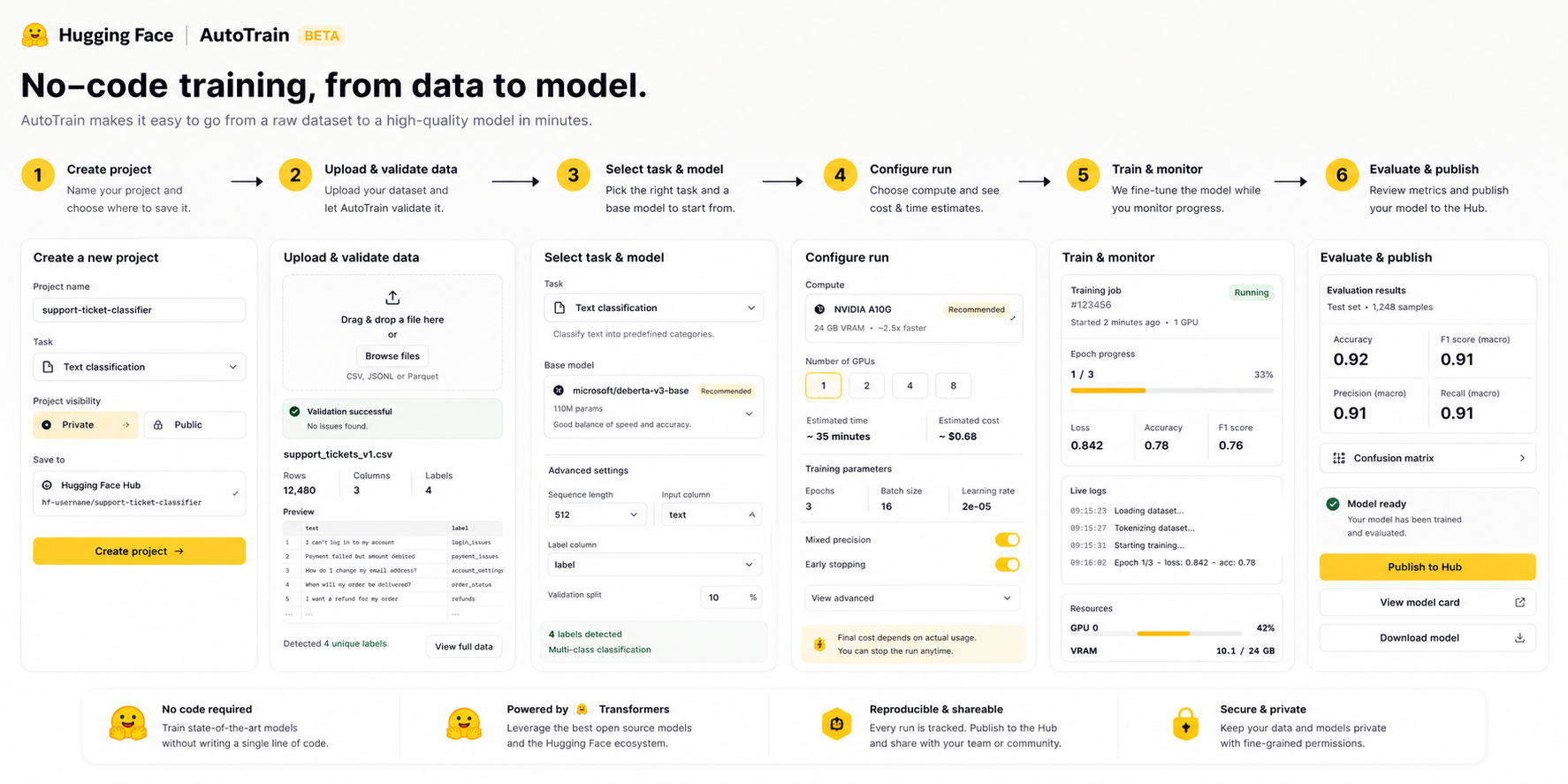
Hugging Face AutoTrain Readiness Copilot.
No-code AI training guidance, ML workflow readiness, and explainable model-building assistance.
- Dataset readiness scanner before training.
- Task/model compatibility check for NLP, CV, speech, and tabular data.
- Cost, runtime, hardware, and likely-quality estimate.
- Plain-language failure diagnosis and one-click repair plan.
- Training health monitor and post-run next experiment recommendation.
- Prevents avoidable training failures.
- Gives non-experts confidence before using compute.
- Creates a clearer bridge from demo to deployed model.
- Improves retention by turning failure into guided iteration.
AutoTrain promises no-code model training, but users still need ML judgment to know if data is clean, labels are consistent, task selection is right, hardware is adequate, and results are production-worthy. Without guidance, many users only discover mistakes after a failed or weak run.
Increase successful, trusted AutoTrain completions by surfacing readiness, blockers, expected cost/time, and next-best training actions before and during the run.
1.2 Who It Is For
| User cohort | Description | How they use it | Primary product promise |
|---|---|---|---|
| No-code AI builders | PMs, founders, analysts, and domain teams who have data but not deep ML operations skill. | Upload dataset, review readiness, fix blockers, launch a guided training job. | Know if the project is trainable before spending compute. |
| Applied ML teams | Small AI teams that need faster experimentation without writing repetitive training code. | Use scanner and experiment guidance to shorten data-to-model iteration. | Reduce failed runs and improve experiment quality. |
| Enterprise enablement teams | Internal platform teams evaluating no-code training for business units. | Use readiness reports and audit history to govern model-building behavior. | Make no-code training governable and explainable. |
1.3 Why We Are Building It
Background
AutoTrain makes training accessible, but accessibility creates a new PM problem: users can click through a workflow without understanding whether their inputs are valid enough to produce a useful model. A readiness layer protects the promise of no-code training.
Assumptions
- Dataset quality issues are a leading cause of failed or weak AutoTrain outcomes.
- Users accept guidance if it is specific, explainable, and tied to a clear next action.
- Cost/time estimates reduce anxiety and improve launch confidence.
- Hugging Face can use task metadata, run telemetry, and dataset checks without exposing private data.
Market Opportunity
No-code training sits between generic AI tooling and expert ML platforms. A readiness copilot makes AutoTrain more credible for teams that need speed but cannot tolerate silent failures or unclear model quality.
Company Goals Alignment
- Hub usage: more successful model artifacts and Spaces/CLI follow-through.
- Trust: explainable training outcomes instead of black-box failure.
- Revenue: better conversion into compute, enterprise, and managed workflows.
- Community: reusable readiness patterns and templates for common tasks.
Feature Architecture And Working
The feature has three layers: user-facing readiness guidance, backend decision services, and telemetry loops that learn from actual training outcomes.
2.1 User Flow And Entry Points
| Screen | Function | Primary CTA | Alternate state | Completion condition |
|---|---|---|---|---|
| Project setup | Collect task, data source, privacy, and desired output. | Scan dataset | Use template | Project has dataset and task context. |
| Readiness report | Shows readiness score, blockers, warnings, and expected cost/time. | Apply fixes | Train anyway with warning | User accepts or resolves readiness state. |
| Training monitor | Shows health, loss trend, failure risk, and warnings during run. | Continue monitoring | Stop and repair | Run completes or user stops with clear reason. |
| Result summary | Explains metrics, model-card readiness, deployment readiness, and next experiment. | Publish model | Run next experiment | Model artifact or retry plan is created. |
2.2 Backend Decision Process
2.3 APIs And Responsibilities
| API / service | Responsibility | Inputs | Outputs | Owner |
|---|---|---|---|---|
POST /readiness/scan | Runs dataset and task readiness checks. | Project id, dataset pointer, task type, privacy mode. | Readiness state, blockers, warnings, scan id. | AutoTrain platform |
POST /readiness/estimate | Estimates cost, runtime, hardware, and quality risk. | Scan id, model family, dataset size, hardware tier. | Cost range, runtime range, risk score, CTA config. | Compute platform |
GET /readiness/reasons | Maps technical checks to builder-safe explanation. | Reason code, task, audience, locale. | UI copy, docs link, repair action. | Product + docs |
POST /runs/health | Tracks job progress and detects failing runs. | Run id, metrics, logs, resource usage. | Health state, warning, next action. | Training infra |
2.4 Data Points, Edge Cases, And Terms
- Dataset profile, schema, label distribution, split metadata.
- Task type, model family, hardware tier, expected metric.
- Run logs, training metrics, failure reason, user actions.
- Private dataset: run local metadata checks only.
- Huge dataset: sample and show confidence caveat.
- Unknown task: route to template/manual setup.
- Cost estimate unavailable: show safe range and warning.
- P0: wrong readiness allows obviously invalid training.
- P1: cost estimate missing or misleading.
- P2: copy/documentation mismatch.
- Readiness state: ready, needs repair, risky, unsupported.
- Repair action: concrete fix user can apply.
- Run health: active signal during training.
- Outcome link: recommendation-to-result trace.
QA, Acceptance, And Validation Plan
QA must prove the copilot is accurate enough to guide decisions, clear enough for non-experts, and safe enough for compute and model-quality trust.
3.1 UI And Flow QA
| Area | What QA must check | Expected standard | Severity |
|---|---|---|---|
| Readiness card | Score, blocker, warning, CTA, docs link, long labels. | No clipped copy; CTA matches decision. | P0 if unsafe CTA appears. |
| Dataset scanner | Loading, error, partial scan, privacy modes. | User knows what was checked and what was skipped. | P1 |
| Training monitor | Health state, warnings, stop/retry actions. | No run appears healthy when failure signal is active. | P0 |
3.2 API And Analytics QA
| Layer | Validation needed | Negative tests | Monitoring signal |
|---|---|---|---|
| Scan API | Reason codes match dataset fixtures. | Missing labels, corrupt files, class imbalance. | Scan failure rate, latency. |
| Estimate API | Cost/runtime ranges stay within calibrated bounds. | Oversized dataset, unsupported hardware. | Estimate error, run abandonment. |
| Health API | Training warnings match metric/log patterns. | Flat loss, OOM, upload timeout. | Warning precision and support tickets. |
Release Plan
The first release should be a controlled pilot inside AutoTrain projects where users already upload datasets and configure training runs. The release goal is not to automate every ML decision; it is to prevent avoidable failures and make the next action obvious.
4.1 Timeline
4.2 Release Criteria
| Area | Release standard | Evidence required | Blocker threshold |
|---|---|---|---|
| Functionality | Every readiness state returns score, reasons, repair action, CTA, scan id, and model/task context. | Fixture suite across text classification, image classification, object detection, tabular, and speech projects. | Any state without actionable next step. |
| Usability | Non-expert user can explain top blocker, why it matters, and what to do next within one screen. | 5-user usability pass and support-agent review. | Users misunderstand warning as hard failure or ignore P0 blocker. |
| Reliability | Scanner and estimator degrade gracefully for private, huge, or partially uploaded datasets. | Load tests and private-dataset fixtures. | Scan failure blocks project creation without fallback. |
| Performance | Standard dataset scan completes within product-acceptable wait; large scans show progressive status. | p50/p95 scan latency dashboard. | Scan latency causes meaningful project abandonment. |
| Supportability | Support can inspect same reason codes, scan output, and copy shown to user. | Internal support console and ticket macro. | Support cannot explain a readiness decision. |
| Compliance & Audit | Private datasets do not expose examples in logs; every recommendation has policy and model version. | Audit log review and privacy test suite. | Private data leaks into telemetry or screenshots. |
Launch Gate 01
False-ready rate for known bad fixtures is zero before pilot.
Launch Gate 02
Every blocker has repair copy, docs link, and safe CTA.
Launch Gate 03
Run outcome can be joined back to scan recommendation.
Launch Gate 04
Support, docs, and product use the same reason-code language.
Data And Tools
AutoTrain Readiness Copilot needs joined product, dataset, compute, and training-outcome data. The core analytics question is whether a readiness recommendation actually improves training success without reducing useful experimentation.
5.1 Data Points And Joined Views
| View | Primary joins | Key fields | Decision it supports |
|---|---|---|---|
| Readiness scan view | project_id, dataset_id, scan_id, user_id | state, score, blocker_count, warning_count, reason_codes, task_type, privacy_mode | Which users see ready, warning, or blocked states? |
| Dataset quality view | dataset_id, dataset_version, scan_id | missing_labels, class_balance, file_errors, split_health, schema_validity, sample_count | Which data issues most often stop training? |
| Run outcome view | scan_id, run_id, model_id | status, final_metric, cost, runtime, failure_reason, hardware_tier, published_artifact | Did the recommendation predict successful training? |
| Repair funnel view | scan_id, project_id, event_session_id | repair_opened, repair_completed, train_anyway_clicked, docs_clicked, support_contacted | Which blockers are solvable in-product? |
| Business impact view | account_id, billing_id, project_id | compute_spend, repeat_runs, plan_type, retention, support_cost, enterprise_flag | Does readiness improve conversion and retention? |
5.2 Tools And Dashboarding
Use PostHog, Mixpanel, or Amplitude to track readiness viewed, blocker clicked, repair completed, train started, train-anyway clicked, run completed, model published.
Maintain fixture datasets for common failures: invalid labels, imbalanced classes, wrong schema, corrupt files, unsupported task, small sample size, and expensive run risk.
Use OpenTelemetry, Grafana, or Datadog for scanner latency, estimator errors, failed background jobs, queue wait, and scan timeout rate.
Track readiness distribution, repair conversion, successful completion, false-ready reports, support tickets, and compute conversion by cohort.
Success Metrics
Metrics must prove that readiness guidance improves model-building outcomes, not just that users click more UI. The scorecard balances completion, model quality, compute safety, and user understanding.
Percentage of users who receive readiness guidance, resolve required blockers or accept safe warnings, train successfully, and publish or use a model artifact.
| Metric group | Metric | Target | Why it matters | Guardrail |
|---|---|---|---|---|
| Activation | Project created → readiness viewed → primary CTA clicked | 45%+ | Users discover and understand the guidance surface. | No increase in project setup abandonment. |
| Repair | Blocking issue opened → repair action completed | 30%+ | The product helps users fix problems inside AutoTrain. | No forced repair when train-anyway is safe. |
| Completion | Ready/warned users who complete training successfully | +20% | Guidance improves actual training success. | No false-ready increase. |
| Quality | Failed jobs after ready state | -25% | Readiness should prevent avoidable failures. | P0 if known invalid fixtures pass. |
| Compute | Run abandoned due to cost surprise | -15% | Cost/runtime estimates reduce uncertainty. | Estimate error monitored weekly. |
| Support | Support contacts per failed AutoTrain run | -20% | Reason codes should answer common questions before tickets. | No increase in escalations from unclear copy. |
| Business | Repeat training projects among exposed users | +15% | Confidence should increase repeat usage. | Compute spend quality remains healthy. |
Additional Details
7.1 Competitive Gap And How AutoTrain Can Win
| Alternative | What users get today | Gap | AutoTrain opportunity |
|---|---|---|---|
| Generic notebook training | Full control with code. | Requires ML skill, setup, and debugging. | No-code path with explainable readiness and managed training. |
| Cloud AutoML tools | Managed training workflows. | Often opaque, cloud-specific, and less community-native. | Hub-native artifacts, open model ecosystem, clear repair guidance. |
| Fine-tuning SaaS tools | Simple upload and train flows. | Weak dataset reasoning and limited task diversity. | Task-aware checks across NLP, CV, speech, and tabular workflows. |
| Manual ML consulting | Expert diagnosis. | Slow, expensive, and not embedded in product. | Productize the common first-pass expert review. |
7.2 Responsibility Map
| Team | Ownership | Definition of done |
|---|---|---|
| Product | Readiness states, scope, launch sequencing, success metrics, and risk tradeoffs. | Decision contract signed off by platform, ML, support, and docs. |
| Design | Readiness report, repair drawer, training health panel, warning language, mobile/tablet behavior. | User can understand issue and next action without ML vocabulary overload. |
| ML platform | Dataset scanner, model/task compatibility, estimator, run-health signals, fixtures. | Fixture checks pass and outcome backtests are reviewed. |
| Frontend | AutoTrain screens, states, telemetry, accessibility, and responsive behavior. | No clipped states and every CTA is connected to backend reason code. |
| Docs + DevRel | Reason-code docs, examples, templates, release notes, and support macros. | Every common blocker has a short explanation and recommended fix. |
Future Ideas And Roadmap
The roadmap should move from explainable readiness to assisted repair, then to a learning system that improves AutoTrain recommendations from real training outcomes.
| Horizon | Idea | User value | Dependency | Risk |
|---|---|---|---|---|
| Near term | Reason-code docs and repair examples | Reduces confusion and support dependency. | Docs, support macros, UI copy. | Copy becomes stale if rules change. |
| Near term | Training health warnings | Users know early if a run is likely failing. | Run logs and metrics stream. | False alarms stop valid runs. |
| Medium term | Auto-repair dataset actions | Turns diagnosis into completion. | Safe dataset transformation layer. | Repair may alter data incorrectly. |
| Medium term | Outcome-calibrated estimator | Improves cost/time/quality predictions. | Joined scan-to-run outcome history. | Cold-start predictions may be weak. |
| Long term | Autonomous training advisor | Runs controlled experiment plans for non-expert users. | Policy, budget, privacy, and evaluation guardrails. | Over-automation without trust. |